Linking your BVN to bank accounts, getting official bank statements on your phone, and recovering a lost account number are among the top tasks every Nigerian bank customer needs to do especially during admissions, scholarship, salary setup, or official verifications. Since 2023–2025 regulators and banks tightened identity rules, it’s important to follow secure, official channels only. This guide walks you through clear, bank-agnostic steps you can use for any Nigerian bank (GTBank, FirstBank, Access Bank, UBA, FCMB, Zenith, Polaris, Covenant, etc.), plus proven alternatives (USSD, internet banking, customer care) when apps or branches aren’t convenient. Wherever a bank-specific instruction is required, I’ve noted it but always confirm on your bank’s official website or support channels. (Updated November 2025.)
Table of Contents
1. What is BVN and why linking matters
BVN (Bank Verification Number) is the biometric ID assigned to bank customers and maintained through the BVN system (operated via NIBSS). Banks use BVN to uniquely identify customers across accounts and to reduce fraud. Regulators require banks and many financial service providers to ensure accounts are properly linked to BVN and, increasingly, to NIN (National Identification Number). Linking ensures your accounts remain fully operational and prevents suspension or “no-debit” actions on unfitted accounts.
2. How to link your BVN (or NIN) to any bank account, 5 methods (step-by-step)
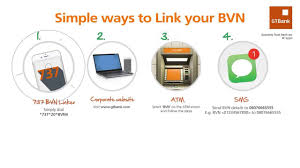
Important: Procedures differ by bank. Use your bank’s official app, website, or verified customer-care lines. If a step below is not available on your bank, use the next method.
Method A. Use your bank’s official mobile app (fastest & most convenient)
- Open your bank’s official mobile app (e.g., GTWorld, FirstMobile, AccessMore, UBA Mobile).
- Sign in with your username/MPIN/biometrics.
- Go to Profile / Settings / Personal Details. Look for BVN or NIN field.
- Enter your BVN (11 digits) or NIN (if linking NIN to BVN) and submit. The bank will validate against the BVN database and confirm.
- You may be asked to upload an ID or selfie for verification; follow prompts.
- If the field is locked, the app should show an instruction to “Visit branch” or “Submit NIN” follow that instruction. Many banks allow NIN submission through a simple form in the app. (Example: FCMB has a NIN submission portal.)
Method B. Internet banking (web portal)
- Log into your bank’s internet banking portal.
- Look for Profile, Security, or KYC Update.
- Enter BVN or submit NIN as required. Save and wait for the bank to confirm (often within minutes to 24 hours).
Method C. USSD (where supported)
- Dial your bank’s USSD code (official code from bank website).
- Choose Profile / Update BVN / NIN if present.
- Enter BVN or NIN and follow prompts. Note: not all banks support BVN update via USSD check your bank first.
Method D. Bank branch (the fallback)
- Bring your valid ID (national ID/driver’s licence/international passport), proof of account (printout or ATM card), and your BVN slip (if you have it).
- Ask the customer-service officer to link BVN/NIN to your account or to update KYC. They’ll enter the BVN and confirm. This method is always accepted.
Method E. Bank customer care / email or WhatsApp channel
- Many banks accept NIN/BVN submission via their verified WhatsApp support number or secure web form.
- Follow the bank’s instructions carefully; do not send ID images to unverified channels. Confirm the contact via the bank’s official website first.
When the bank asks for NIN vs BVN: regulators have required customers to link NIN to BVN records. Some banks ask you to submit NIN in addition to BVN; others can link BVN using the BVN number alone. Always check your bank’s guidance.
3. Quick reference. where to start for major banks
| Bank | Common first step to link BVN/NIN | Notes |
|---|---|---|
| GTBank | GTWorld app → Profile → BVN/NIN | App usually shows NIN submission form |
| FirstBank | FirstMobile / internet banking → KYC update | Also NIN web form for some customers |
| Access Bank | AccessMore app / branch | WhatsApp channel available for some services |
| UBA | UBA Mobile / branch | App often shows KYC update |
| FCMB | FCMB NIN submission portal / branch | FCMB runs an online NIN form. |
| Zenith | Zenith Mobile / branch | Verify on bank site |
| Covenant / Babcock-affiliated banks | App or branch | Smaller banks may require branch visit |
If your bank is not listed: open the bank’s official website > Support/FAQs and search “BVN” or “NIN”.
4. How to get your bank statement on mobile apps. step-by-step
There are several statement types:
- Mini statement last 5–10 transactions (USSD, app).
- Full statement (PDF) custom date range (app or internet banking).
- E-statement (email/PDF) emailed by bank or downloaded from app/web.
Option 1. Use the bank’s mobile app (recommended)
- Open bank app and sign in.
- Menu → Accounts → select the account.
- Choose Statements, E-statement, Transaction history, or similar.
- Choose the date range (e.g., Jan 1, 2025 Nov 1, 2025).
- Tap Download PDF or Send to email. Some apps let you export or share the PDF.
- Save the PDF to your phone or cloud storage.
Notes: Apps usually allow a 3–12 month range by default. For longer periods request via internet banking or email.
Option 2. Internet banking (web)
- Log in to internet banking.
- Accounts → Statement or Reports → choose date range → Download PDF.
- Some banks produce official e-statements that show bank stamp or digital signature.
Option 3. USSD (for mini-statement)
- Dial your bank’s USSD code (example formats vary).
- Choose Mini statement. The system shows last 3–10 transactions.
- Use this for quick checks but not for formal documentation.
Option 4 — Email request / WhatsApp / Branch
- Official email/WhatsApp portal (see bank website) request a stamped statement.
- Branch: request a printed statement (may have a fee). Useful when you need a bank-stamped physical copy for official use.
5. Quick reference. how to get a PDF/full statement for popular banks
| Bank | App | Internet banking | USSD mini | Branch/email |
|---|---|---|---|---|
| GTBank | GTWorld Statements → Download | Yes | *737# or app mini | Branch print or e-statement |
| FirstBank | FirstMobile E-statement | Yes | *894# (mini) | Branch or email support |
| Access Bank | AccessMore Statements | Yes | *901# (mini) | Branch/WhatsApp |
| UBA | UBA Mobile Statements | Yes | *919# (mini) | Branch/Portal |
| FCMB | FCMB Mobile / web | Yes | *329# (mini) | FCMB online NIN portal for docs. |
Always confirm current USSD codes and exact app menus on the bank’s official site codes change and vary by bank/version.
6. How to recover your account number without visiting a branch, 7 methods
If you forgot your account number, here are safe ways to recover it remotely.
Method 1. Check your mobile banking app
Open the bank app → Accounts → the account number is shown with the balance. This is fastest.
Method 2. Internet banking / e-statement
Log in to internet banking or download an e-statement; your account number will be on the statement header.
Method 3. SMS alerts (search your inbox)
Search for past SMS from your bank (e.g., alerts after transfers, balance alerts). SMS usually includes the last 3–6 digits or full account. Check message threads for deposit/alert messages.
Method 4. Email records
If you’ve received salary advice, e-statement, or payment confirmation by email from your bank or employer, the account number is on those emails.
Method 5. ATM card or chequebook
Your account number may be printed on a cheque leaf (if you have chequebook) or shown on some ATM receipts after withdrawal (if the bank prints it). But avoid sharing chequebook images publicly.
Method 6. USSD self-service (where supported)
Some banks offer a USSD menu option to retrieve account number: dial bank’s official USSD and choose Account number or My account menu. If available, follow prompts.
Method 7. Call verified customer care or WhatsApp support
Call the bank’s official customer care number (from the bank website) after security verification (name, DOB, BVN, one-time PIN) they can provide your account number or send it to your registered phone number. Use only numbers listed on the bank’s official website.
If the account is locked or you can’t verify identity remotely: you may need to visit a branch with valid ID for security. Banks will never ask you to share your PIN or full card number over call or message.
7. Safety & scam-avoidance checklist (must read)
- Never send BVN, NIN, or full ID images to unverified phone numbers or social media DMs.
- Do not enter credentials on websites or links you received in SMS/WhatsApp unless you confirmed the link on the official bank site.
- Always check the web address (bank’s official domain) before submitting NIN/BVN details.
- Use 2-factor authentication and enable biometrics on bank apps.
- If told to pay a fee to “unlock” BVN/NIN linking on a third-party site do not pay. Use official channels only.
- If you suspect fraud, contact your bank immediately and change your logins.
8. FAQs
Q1. How long does BVN/NIN linking take?
A: If done via app or internet banking it’s often instant to 24 hours (validation step). If submitted at branch it can be same day but sometimes takes up to 48 hours for back-office checks.
Q2. Can I link BVN to more than one bank?
A: Your BVN is a single identifier linked to your identity. It can be associated with multiple bank accounts you own; the BVN links those accounts to you.
Q3. I don’t remember my BVN how do I get it?
A: Use your bank app (Profile → BVN). Many banks also allow BVN retrieval via customer care after verifying identity, or a USSD service that returns BVN (if supported).
Q4. What if my BVN is flagged or on a watch-list?
A: Banks will notify you and may require documentation to clear watch-list flags. Contact your bank’s fraud desk or customer care immediately.
Q5. I need a stamped/official statement for admission. Can I get that remotely?
A: Many banks can email a signed e-statement or send a PDF stamped with bank details. Otherwise, request a printed stamped statement at a branch. For urgent official use, request e-statement and ask the bank to add a bank stamp or digital validation.
9. Conclusion
Linking your BVN (and NIN) and being able to retrieve official statements and account numbers remotely is now standard in most Nigerian banks. The fastest methods are the bank’s official mobile app or internet banking. When those aren’t available, USSD, secure WhatsApp channels, or a verified customer-care call work well. For any legal or high-security need (e.g., scholarship, visa, employer verification), request a stamped e-statement from your bank. Always verify guidance on your bank’s official site and never share sensitive information to unverified contacts.
Official resources & where to confirm
- NIBSS / Revised BVN framework summary (regulatory background).
- Example bank NIN submission form (FCMB).
- Recent regulatory notices about account restrictions on unfitted BVN/NIN (industry reports).