
With more Nigerian universities adopting electronic payment systems, paying school fees online has never been easier but it’s also a process that demands caution and precision. Whether you are paying tuition, acceptance fees, hostel charges, or other levies, doing it correctly ensures your transaction is recorded and validated by the school. This guide explains how to pay school fees online for any university: from generating the right invoice, through using Remita (or other gateways), to confirming payment and keeping proof. You’ll also learn expert tips to avoid fraud and mistakes. Use this as a reference for the 2025 academic session.
Table of Contents
1. Why Universities Use Online Fee Payment Systems
- Efficiency & Transparency: Schools can track payments instantly and reduce manual errors.
- Better Record Keeping: Students and the bursary both have clear, timestamped records.
- Convenience: Payment can be done from home, on mobile, or at any bank with your invoice.
- Security: Payment gateways like Remita provide secure transaction tracking.
2. Common Payment Methods Universities Use
Multiple universities in Nigeria use the following payment methods:
- Remita very common; many universities require an RRR (Remita Retrieval Reference).
- Interswitch / WebPAY some schools integrate Interswitch for online payments.
- Quickteller used by some universities in their portal invoice process.
- Bank branch payments after generating invoice / RRR, you can pay at designated banks.
3. Step‑by‑Step Process to Pay School Fees Online
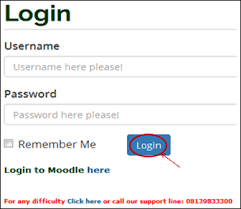
A. Log in to Your University Portal
- Go to your university’s student portal (example: LASU, UNIUYO, etc.).
- Use your matric number or JAMB number + password to access your dashboard.
B. Navigate to the Fees / Payments Section
- Look for a menu item like “School Fees,” “Payments,” or “Fee Invoice.”
- Choose the session, level, and fee type (tuition, acceptance, hostel) you want to pay.
C. Generate an Invoice / RRR
- Select “Fetch fees for payment” or similar.
- The portal will generate a Remita Retrieval Reference (RRR) or a transaction invoice.
- Print or screenshot the invoice.
4. How to Generate Invoice / RRR for Payment
To pay using Remita:
- On your university portal, after “Fetch fees,” hit “Checkout.”
- An RRR (Remita Retrieval Reference) is generated this is a unique payment code.
- Use that RRR for payment either online (card) or at a bank branch.
5. Making Payments via Remita (Card & Bank)
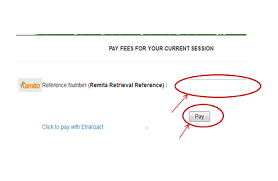
Pay Online with Card:
- Go to Remita.net or click through your school portal.
- Choose “Pay a Biller”, select your university as the payee.
- Enter the RRR number, amount, and your contact details.
- Choose Card (Visa/MasterCard) and complete the payment.
- After transaction, you will receive an electronic receipt.
Pay Via Bank:
- Use the printed invoice with RRR.
- Go to any commercial bank that accepts Remita payments.
- Pay with the RRR number. Ask bank teller to process it under “Student Charges” or “School Fees.”
- Bank issues a Remita printout keep it.
- Return to your university portal to re‑query the transaction (confirm payment).
6. Alternative Payment Options (Interswitch, Quickteller, etc.)
Some universities also support:
- Interswitch WebPAY: Using this, you generate invoice in your portal, then choose “Interswitch / WebPAY” to pay online.
- Quickteller: For universities with Quickteller integration, after generating invoice you can “Pay with Quickteller.”
- These platforms work similarly: generate invoice → make payment → confirm transaction in the student portal.
7. Confirming Your Payment and Printing Receipt
- After paying (bank or online), return to your university portal.
- Use “Re‑query” (or “Check Payments”) option if available this typically refreshes the portal and shows your payment.
- Once confirmed, print your official school receipt from the portal (with your RRR / transaction ID).
- Keep both soft (PDF) and physical copies of your receipt for your records.
8. What to Do When Payment Isn’t Reflected
- Wait for 24–48 hours: Some payments take time to show up in the university system.
- Use the “Re‑query” or “Check Transaction” option on portal again.
- If it’s still not reflecting, contact your bursary or finance office with: RRR, bank payment slip, and your student portal screenshot.
- Report suspected issues: If payment was made and not credited, ask for a reconciliation reference.
9. Tips to Avoid Scams and Payment Mistakes
✅ Only pay through your university student portal or Remita do NOT pay random individuals.
✅ Generate a new invoice / RRR every session or payment don’t reuse old RRRs.
✅ Use secured connections (your school’s official portal, not a copied link) when paying.
✅ Keep proofs of payment: screenshot RRR, save receipt, save bank printout.
✅ Report suspicious requests: If someone asks for your card PIN or tells you to pay into a private account, stop and verify with the bursary.
10. Frequently Asked Questions (FAQs)
Q1: What is an RRR code and why is it important?
A1: RRR (Remita Retrieval Reference) is a unique code generated for every billing invoice. It ensures the transaction is tracked and credited to the correct school account. Without it, payments may not be recognized.
Q2: Can I pay school fees in instalments online?
A2: It depends on the university. Some schools allow payment in parts: you generate an invoice, pay part now, and pay the remaining later — but re-query each part after payment to confirm it’s recorded.
Q3: What happens if I pay the wrong amount?
A3: Contact your school’s bursary or finance office with your payment receipt, RRR, and student ID. They can reconcile and make adjustments if needed.
Q4: How do I print my receipt?
A4: After confirmation on your student portal, go to the “Payment History” or “Fee Receipt” section and print/download your receipt (includes transaction ID and RRR).
Q5: Is it safe to pay using my ATM / Debit Card?
A5: Yes, as long as you’re on a secured payment gateway (Remita or approved bank site). Always check for “https://” in the URL, do not share your PIN, and avoid using public Wi-Fi for payment.
Conclusion
Paying school fees online for Nigerian universities has become more streamlined, secure, and convenient thanks to payment platforms like Remita, Interswitch, and Quickteller. By following the correct steps generating your invoice or RRR, choosing the right payment method, confirming your transaction, and keeping your receipts you can avoid payment problems and ensure your fees are properly credited. Use the tips above to guard against fraud, and always use your university’s official portal for every payment. Happy studying and safe payments!